


Core Web Vitals measure how quickly a page's main content appears, how promptly it responds to interactions, and how stable its layout is. Prioritize this work when important pages frustrate real visitors, especially during booking, buying, or contacting your business. A low test score alone does not tell you which fix deserves your next dollar.
Understand the three measurements
LCP (Largest Contentful Paint) measures loading of the largest visible content element. INP (Interaction to Next Paint) measures responsiveness to interactions. CLS (Cumulative Layout Shift) measures unexpected movement of visible content.
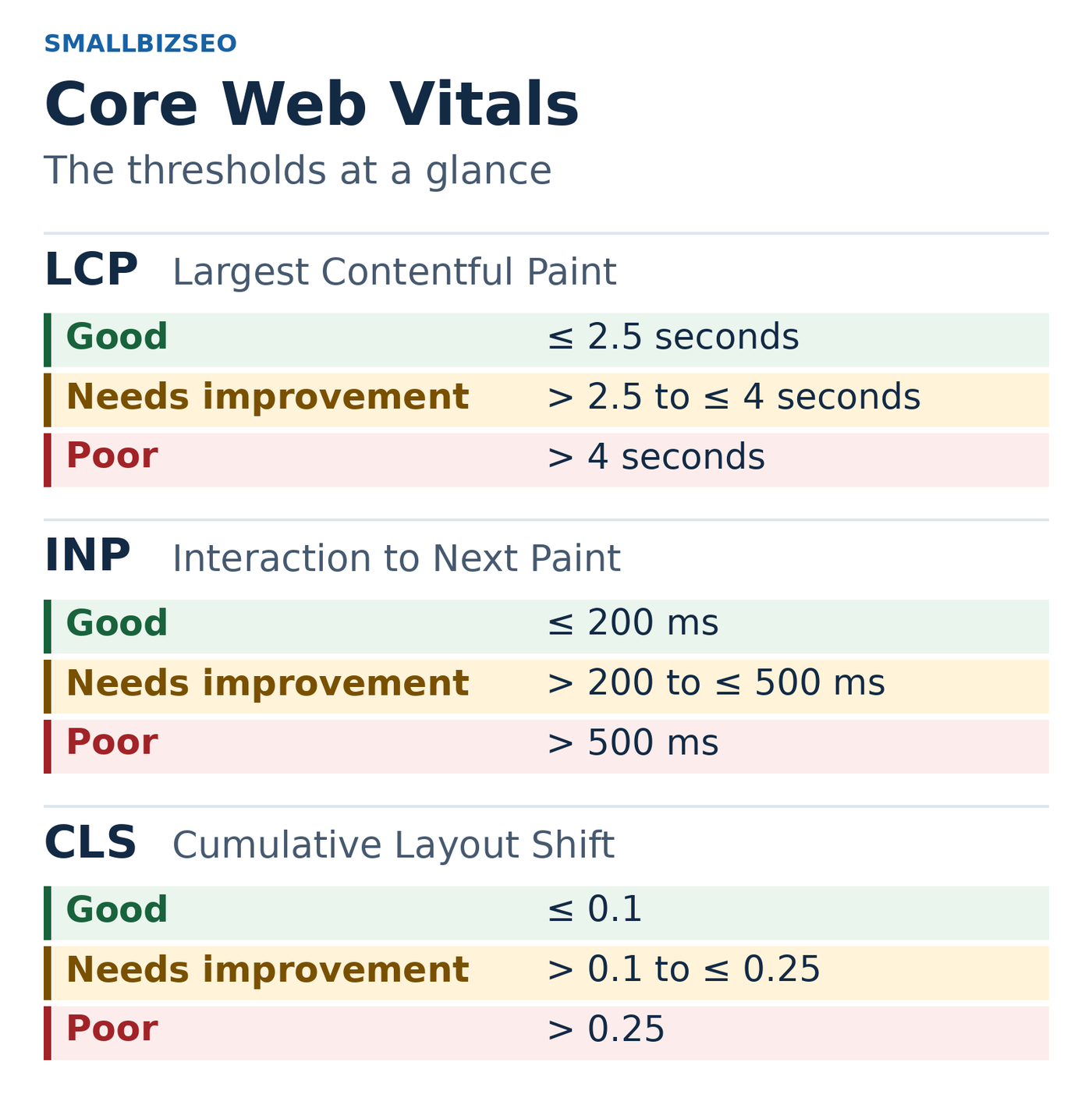
Core Web Vitals thresholds. A good assessment requires all three metrics to meet the good threshold at the 75th percentile, with mobile and desktop evaluated separately. CLS is a score, not a duration.
Metric | Good | Needs improvement | Poor |
|---|---|---|---|
LCP | 2.5 seconds or less | Above 2.5 through 4 seconds | Above 4 seconds |
INP | 200 milliseconds or less | Above 200 through 500 milliseconds | Above 500 milliseconds |
CLS | 0.1 or less | Above 0.1 through 0.25 | Above 0.25 |
Interpret the 75th-percentile field measurements, evaluated separately for mobile and desktop. All three metrics must be good for a good Core Web Vitals assessment. These are user-experience measures, not a guarantee of rankings. CLS has no time unit, and the three metrics do not share a numerical scale.Sources: Google’s Core Web Vitals report documentation and Web Vitals guidance. Thresholds and interpretation checked October 14, 2026.
Separate real-user evidence from a test run
PageSpeed Insights combines field data from actual eligible Chrome users with a simulated lab test. Field data covers a rolling 28-day period. Lab diagnostics help identify possible causes, but one simulated test does not represent every customer's experience.
A smaller website may lack enough field data. The report may show site-level data instead of page-level data, or no field assessment. That is a data limitation, not proof that the page passes or fails. After a fix, historical field measurements also take time to reflect the change.
Decide what deserves attention first
Identify affected page types and their role in generating inquiries or sales.
Try the customer journey on a phone, including menus, forms, and booking steps.
Ask the developer to identify likely causes and estimate effort. Possibilities include oversized images, unnecessary scripts, slow server responses, or elements without reserved space.
Prioritize a repeatable fix that helps important pages, then retest functionality and performance.
A hypothetical example
A fitness studio's timetable shifts while loading, causing visitors to tap the wrong class. Reserving space for the timetable and its images may directly improve booking. Spending the same time polishing a rarely visited legal page from an already good score toward 100 would have a weaker business case.
Keep the SEO benefit in perspective
Google uses Core Web Vitals in ranking systems, but good scores do not guarantee top positions. Its page experience guidance cautions against pursuing a perfect score solely for SEO. Broken forms, inaccessible pages, and unclear service information may be more urgent.
Your next step
Test one important service or product page and the next step in its customer journey. Ask your developer for the most useful fix, the evidence supporting it, and a way to confirm that customers can still complete their task.